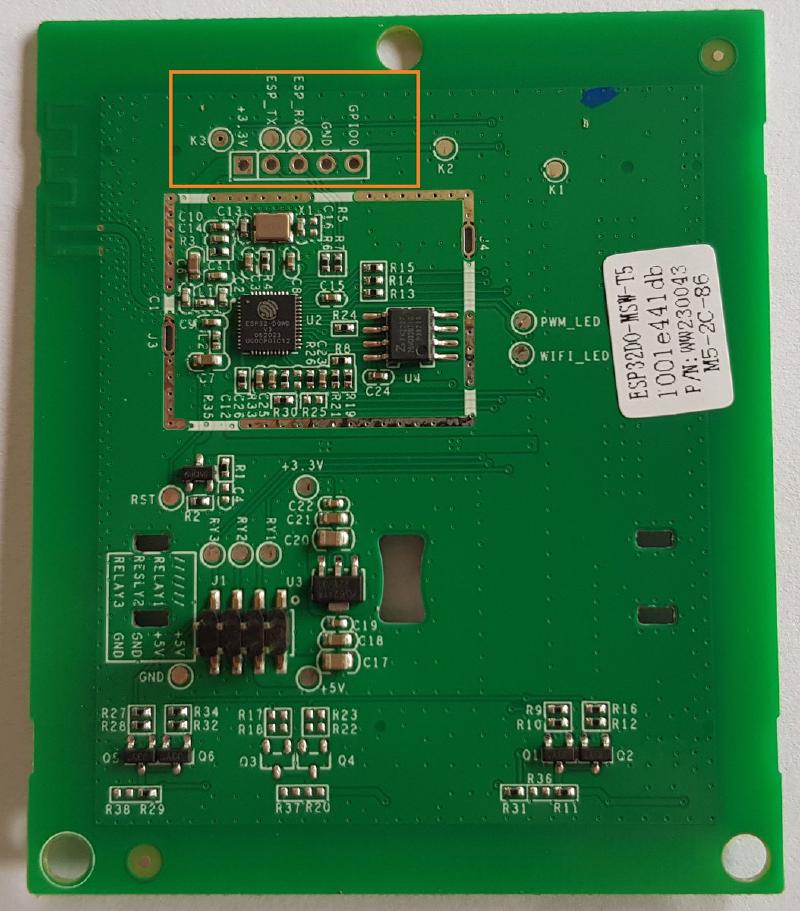
Notes
- the Matter compatible version of this switch (part numbers ending in W, e.g. M5-2C-86W) is locked and cannot be flashed
- status LED (blue) in left-most button
- channel LEDs (red) are dimmable (PWM)
while relays OFF; 100% bright when ON
- in 1-gang version LED 1 to/can be
activated separately from Relay
- in 2-gang version LED 2 to/can be
activated separately from Relay
GPIO Pinout
1-Gang Version
| Pin | Function |
|---|
| GPIO00 | Button 1 |
| GPIO23 | Relay 1 |
| GPIO19 | LED 1 |
| GPIO05 | Status LED |
| GPIO18 | PWM for LED 1 |
2-Gang Version
| Pin | Function |
|---|
| GPIO04 | Button 1 |
| GPIO15 | Button 2 |
| GPIO23 | Relay 1 / LED 1 |
| GPIO19 | Relay 2 |
| GPIO22 | LED 2 |
| GPIO05 | Status LED |
| GPIO18 | PWM for LED 1/2 |
3-Gang Version
| Pin | Function |
|---|
| GPIO04 | Button 1 |
| GPIO00 | Button 2 |
| GPIO15 | Button 3 |
| GPIO23 | Relay 1 / LED 1 |
| GPIO19 | Relay 2 / LED 2 |
| GPIO22 | Relay 3 / LED 3 |
| GPIO05 | Status LED |
| GPIO18 | PWM for LED 1/2/3 |
Basic Configuration (2-Gang)
esphome:
  name: Sonoff M5 2gang
esp32:
  board: esp32dev
  framework:
    type: arduino
logger:
  level: INFO
wifi:
  ssid: !secret wifi_ssid
  password: !secret wifi_password
api:
  encryption:
    key: !secret esp_api_key
ota:
  - platform: esphome
    password: !secret ota_secret
sensor:
  - platform: wifi_signal
    name: "RSSI"
    id: sensor_rssi
    update_interval: 90s
    entity_category: "diagnostic"
  - platform: uptime
    name: "Uptime"
    id: sensor_uptime
    update_interval: 300s
    entity_category: "diagnostic"
button:
  - platform: restart
    name: "Restart"
    id: button_restart
switch:
  - platform: gpio
    name: "Left"
    pin: GPIO23
    id: relay_1
  - platform: gpio
    name: "Right"
    pin: GPIO19
    id: relay_2
    on_turn_on:
      - output.turn_on: led_2
    on_turn_off:
      - output.turn_off: led_2
output:
  - platform: gpio
    id: led_2
    pin:
      number: GPIO22
      inverted: False
  - platform: ledc
    id: pwm_output
    pin: GPIO18
    frequency: 1000 Hz
binary_sensor:
  - platform: status
    name: "Status"
    id: sensor_status
  - platform: template
    name: "API connected"
    id: sensor_api_connected
    internal: True
    entity_category: 'diagnostic'
    device_class: 'connectivity'
    lambda: return global_api_server->is_connected();
    on_press:
      - light.turn_on: led_status
    on_release:
      - light.turn_off: led_status
  - platform: gpio
    name: "Left"
    pin:
      number: GPIO04
      mode: INPUT_PULLUP
      inverted: False
    on_press:
      - switch.toggle: relay_1
  - platform: gpio
    name: "Right"
    pin:
      number: GPIO15
      mode: INPUT_PULLUP
      inverted: False
    on_press:
      - switch.toggle: relay_2
light:
  - platform: status_led
    name: "LED"
    id: led_status
    pin:
      number: GPIO05
      inverted: True
    internal: True
    restore_mode: ALWAYS_OFF
  - platform: monochromatic
    output: pwm_output
    name: "LEDs"
    restore_mode: RESTORE_DEFAULT_OFF
    icon: 'mdi:led-outline'
    entity_category: 'config'
Advanced Configuration (3-Gang, US Version)
# ESPHome Firmware
# Sonoff Switchman M5 3-Gang US
# Copyright (c) 2024 Mario Di Vece
# License: [MIT](https://opensource.org/license/mit/)
# Decription:
# Aims to provide a feature-rich, production-ready firmware for this elegant device
# - Provides Diagnostic data plus, status LED indicator when not connected to Home Assistant API
# - Relays may be configured individually on the UI to work in decoupled mode.
#   LEDs are physically connected to the relays, and they can't be individually controlled :(
# - Exposes gestures via events:
#   esphome.on_gesture { button: (A|B|C), gesture: (click|double_click|hold) }
# - Off-state (Background Brightness) of the LEDs is configurable via the UI
#
# For the below example, you need to keep the following entries in your secrets.yaml file:
#  - wifi_ssid: "<secret>"
#  - wifi_password: "<secret>"
#  - ota_password: "<secret>"
#  - esp_key: "<32-byte-base-64-secret>"
#
# Example file (sonoff-m5-3g-office-01.yaml)
#
# substitutions:
#   usemac: "false"
#   friendly: "Sonoff M5 3G - Office Switch - 01"
#   uniquename: "sonoff-m5-3g-office-01"
#
# packages:
#   base_package:
#     url: https://github.com/mariodivece/esphometemplates/
#     ref: main
#     files: [sonoff-m5-3g-us.yaml]
#     refresh: 0d
#
# wifi:
#   use_address: "10.16.40.49"
# Basic substitutions (can be safely overriden)
substitutions:
  usemac: "true"
  friendly: "Sonoff Switchman M5 3G US"
  uniquename: "switch-m5-3g"
  loglevel: INFO
  apikey: !secret esp_key
  wifi_ssid: !secret wifi_ssid
  wifi_password: !secret wifi_password
  ota_password: !secret ota_password
  device_name: "M53G"
  device_make: "Sonoff"
  sw_version: "2024.2.4"
  package_url: "github://mariodivece/esphometemplates/sonoff-m5-3g-us.yaml@main"
# Define the board for the compiler
esp32:
  board: esp32dev
  framework:
    type: arduino
# Setup the integration and define some project variables
esphome:
  name: "${uniquename}"
  friendly_name: "${friendly}"
  comment: "${device_name} by ${device_make}"
  name_add_mac_suffix: ${usemac}
  min_version: "2023.2.0"
  project:
    name: "${device_make}.${device_name}"
    version: "${sw_version}"
# Allow importing this package
dashboard_import:
  package_import_url: ${package_url}
  import_full_config: false
# Enable logging
logger:
  level: "${loglevel}"
# Enable Home Assistant API
api:
  encryption:
    key: "${apikey}"
# Enable OTA
ota:
  - platform: esphome
    safe_mode: true
    password: !secret ota_password
# Enable WiFi and AP for captive portal
wifi:
  fast_connect: false
  power_save_mode: none
  ssid: "${wifi_ssid}"
  password: "${wifi_password}"
  # Enable fallback hotspot (captive portal) in case wifi connection fails
  # password for hostspot is the same as password for net AP (needs captive_portal)
  ap:
    ssid: "${uniquename}-setup"
    password: "${wifi_password}"
captive_portal:
# Diagnostic output sensors
text_sensor:
  - platform: template
    name: "Deployment Version"
    lambda: return {"${sw_version}"};
    icon: "mdi:tag"
    entity_category: diagnostic
  - platform: wifi_info
    ip_address:
      id: ip_address
      name: "IP Address"
      icon: "mdi:wan"
sensor:
  - platform: template
    id: internal_temp
    name: "Internal Temperature"
    icon: "mdi:thermometer"
    unit_of_measurement: "°C"
    entity_category: diagnostic
    disabled_by_default: true
    lambda: return temperatureRead();
  - platform: wifi_signal
    name: "RSSI"
    id: sensor_rssi
    update_interval: 90s
    entity_category: "diagnostic"
  - platform: uptime
    name: "Uptime"
    id: sensor_uptime
    update_interval: 300s
    entity_category: "diagnostic"
# Provide a pre-built button for restarting the device
button:
  - platform: restart
    name: "Restart"
    id: button_restart
switch:
  # Physical GPIO Relay
  - platform: gpio
    name: "Relay A"
    pin: GPIO23
    id: relay_a
  # Physical GPIO Relay
  - platform: gpio
    name: "Relay B"
    pin: GPIO19
    id: relay_b
  # Physical GPIO Relay
  - platform: gpio
    name: "Relay C"
    pin: GPIO22
    id: relay_c
  # Config-only switch to decouple relay from button
  - platform: template
    name: "Decoupling - Relay A"
    id: relay_a_decoupled
    optimistic: true
    restore_mode: RESTORE_DEFAULT_OFF
    icon: 'mdi:link-box-outline'
    entity_category: 'config'
  # Config-only switch to decouple relay from button
  - platform: template
    name: "Decoupling - Relay B"
    id: relay_b_decoupled
    optimistic: true
    restore_mode: RESTORE_DEFAULT_OFF
    icon: 'mdi:link-box-outline'
    entity_category: 'config'
  # Config-only switch to decouple relay from button
  - platform: template
    name: "Decoupling - Relay C"
    id: relay_c_decoupled
    optimistic: true
    restore_mode: RESTORE_DEFAULT_OFF
    icon: 'mdi:link-box-outline'
    entity_category: 'config'
output:
  # Physical GPIO PWM for off-state background brightness
  # This pin controls the background brightness for all LEDs
  # physically attached to the relays
  - platform: ledc
    id: pwm_output
    pin: GPIO18
    frequency: 1000 Hz
binary_sensor:
  # Diagnostic sensor for connection
  - platform: status
    name: "Status"
    id: sensor_status
  # Make the status LED blink when not connected/trying to connect
  - platform: template
    name: "API connected"
    id: sensor_api_connected
    internal: true
    entity_category: 'diagnostic'
    device_class: 'connectivity'
    lambda: return global_api_server->is_connected();
    on_press:
      - light.turn_off: led_status
    on_release:
      - light.turn_on: led_status
  # Physical Button A
  - platform: gpio
    name: "Button A"
    id: button_a
    pin:
      number: GPIO04
      mode: INPUT_PULLUP
      inverted: true
    filters:
      - delayed_on: 10ms
    on_press:
      - if:
          condition:
            switch.is_off: relay_a_decoupled
          then:
            - switch.toggle: relay_a
    on_multi_click:
      # single click detection
      - timing:
        - ON for at most 900ms
        - OFF for at least 600ms
        then:
          - homeassistant.event:
              event: esphome.on_gesture
              data:
                button: "A"
                gesture: "single_click"
      # double click detection
      - timing:
          - ON for at most 500ms
          - OFF for at most 400ms
          - ON for at most 500ms
          - OFF for at least 250ms
        then:
          - homeassistant.event:
              event: esphome.on_gesture
              data:
                button: "A"
                gesture: "double_click"
      # hold detection
      - timing:
          - ON for at least 1s
        then:
          - while:
              condition:
                binary_sensor.is_on: button_a
              then:
                - light.toggle: led_status
                - homeassistant.event:
                    event: esphome.on_gesture
                    data:
                      button: "A"
                      gesture: "button_hold"
                - delay: 100ms
          - light.turn_off: led_status
  - platform: gpio
    name: "Button B"
    id: button_b
    pin:
      number: GPIO00
      mode: INPUT_PULLUP
      inverted: true
    filters:
      - delayed_on: 10ms
    on_press:
      - if:
          condition:
            switch.is_off: relay_b_decoupled
          then:
            - switch.toggle: relay_b
    on_multi_click:
      # single click detection
      - timing:
        - ON for at most 900ms
        - OFF for at least 600ms
        then:
          - homeassistant.event:
              event: esphome.on_gesture
              data:
                button: "B"
                gesture: "single_click"
      # double click detection
      - timing:
          - ON for at most 500ms
          - OFF for at most 400ms
          - ON for at most 500ms
          - OFF for at least 250ms
        then:
          - homeassistant.event:
              event: esphome.on_gesture
              data:
                button: "B"
                gesture: "double_click"
      # hold detection
      - timing:
          - ON for at least 1s
        then:
          - while:
              condition:
                binary_sensor.is_on: button_b
              then:
                - light.toggle: led_status
                - homeassistant.event:
                    event: esphome.on_gesture
                    data:
                      button: "B"
                      gesture: "button_hold"
                - delay: 100ms
          - light.turn_off: led_status
  - platform: gpio
    name: "Button C"
    id: button_c
    pin:
      number: GPIO15
      mode: INPUT_PULLUP
      inverted: true
    filters:
      - delayed_on: 10ms
    on_press:
      - if:
          condition:
            switch.is_off: relay_c_decoupled
          then:
            - switch.toggle: relay_c
    on_multi_click:
      # single click detection
      - timing:
        - ON for at most 900ms
        - OFF for at least 600ms
        then:
          - homeassistant.event:
              event: esphome.on_gesture
              data:
                button: "C"
                gesture: "single_click"
      # double click detection
      - timing:
          - ON for at most 500ms
          - OFF for at most 400ms
          - ON for at most 500ms
          - OFF for at least 250ms
        then:
          - homeassistant.event:
              event: esphome.on_gesture
              data:
                button: "C"
                gesture: "double_click"
      # hold detection
      - timing:
          - ON for at least 1s
        then:
          - while:
              condition:
                binary_sensor.is_on: button_c
              then:
                - light.toggle: led_status
                - homeassistant.event:
                    event: esphome.on_gesture
                    data:
                      button: "C"
                      gesture: "button_hold"
                - delay: 100ms
          - light.turn_off: led_status
light:
  # Physical pin to the connection status LED
  # We don't expose this to the HA UI (internal)
  - platform: status_led
    name: "LED"
    id: led_status
    pin:
      number: GPIO05
      inverted: true
    internal: true
    restore_mode: RESTORE_DEFAULT_ON
  # HA UI connection to the background brightness (PWM) pin
  - platform: monochromatic
    output: pwm_output
    name: "Background Brightness"
    restore_mode: RESTORE_DEFAULT_OFF
    icon: 'mdi:led-outline'
    entity_category: 'config'